The Automation Settings page lets you configure how Vidoo automatically generates and updates product videos for your store.
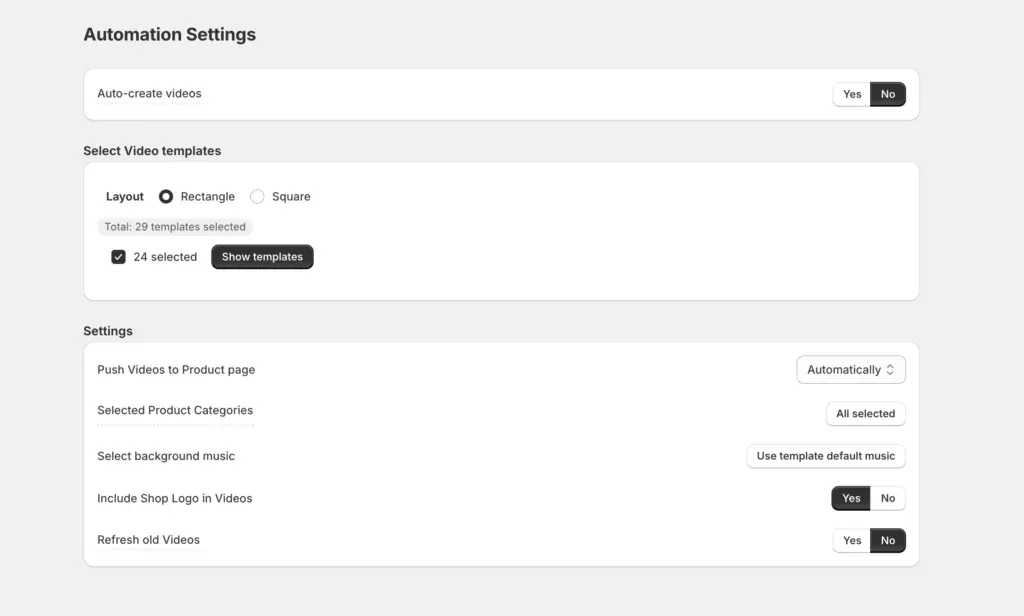
Auto-Create Videos #
Field: Auto-Create Videos (Yes / No)
Description: Enable or disable automatic video generation.
Tip: Vidoo will create videos automatically based on your current plan
Select Video Templates #
Description: Choose the video templates that Vidoo can use for automatically generated product videos.
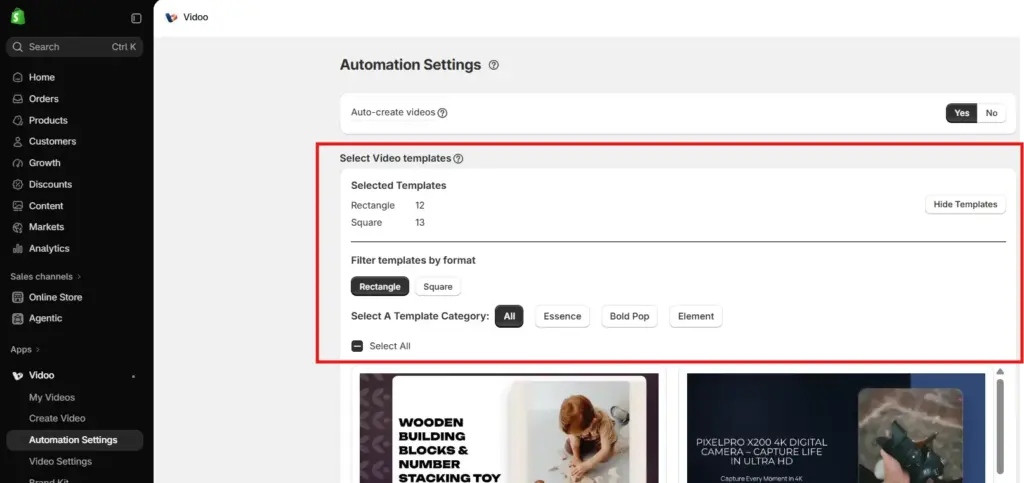
When you open Select Video Templates, you can:
- Filter templates by Rectangle or Square format.
- Filter templates by Template Category, such as All, Essence, Bold Pop, and Element.
- Select individual templates or use Select All to choose all available templates within the selected filters.
- View the number of templates currently selected for each format.
Tip: Select multiple templates to keep your videos varied and avoid using the same design repeatedly. You can also use Template Category to quickly find templates that match the style you want for your store.
Push Videos to Product Page #
Description: When enabled, newly created videos are automatically added to the corresponding product pages. The other options is to approve the videos before pushing to your store.
Tip: Keep this on for full automation — Vidoo will handle publishing for you.
Selected Product Categories #
Field: Select Categories
Description: Define which product categories Vidoo should use to auto-generate videos.
Tip: Vidoo automatically picks products from these categories each day for new video creation.
Include Shop Logo in Videos #
Description: Adds your store’s logo to every video for consistent branding.
Tip: Combine with your Brand Kit (fonts, colors, and music) for a unified visual identity.
Select Background Music #
Description: Choose background music to apply to your automatically generated videos
Tip: Pick a tone that matches your store’s vibe — energetic for fashion, calm for lifestyle, etc. or leave it as the template default to avoid being monotonous
Refresh Old Videos #
Field: Refresh Old Videos
Description: After all products have videos, Vidoo automatically updates older ones using new templates.
Tip: This keeps your product videos fresh, aligned with new styles and templates.