Overview #
If your Vidoo-generated videos play with sound on your homepage but are muted on your catalog or collection pages, the issue is usually caused by your Shopify theme—not by Vidoo.
Vidoo generates videos with audio correctly. However, some Shopify themes, including Horizon, restrict video controls on collection and product listing pages. Since the video player doesn’t display a sound or unmute button, videos remain muted by default.
How to Verify This #
The issue is likely theme-related if you notice the following:
- Videos play with sound on your homepage.
- The same videos play without sound on your collection or catalog pages.
- The video player only shows basic controls (such as Play/Pause) and does not include a Sound or Unmute button.
How to Fix It #
If you’re using the Shopify Horizon theme:
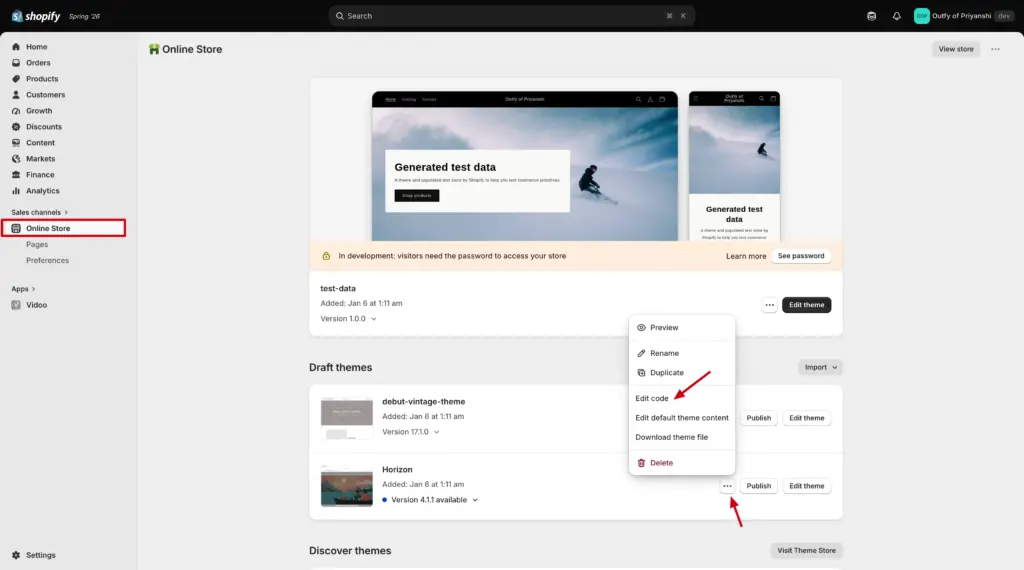
Step 1: In your Shopify admin, go to Online Store → Themes.
Step 2: On your active Horizon theme, click the ⋯ (three dots) menu and select Edit code.
Step 3: Open the product-media.liquid file.
Step 4: Search for disable_controls.
Step 5: If it is set to true, change it to false.
Step 6: Click Save, then test the videos on your collection or catalog page to see if the sound is now available.
If changing disable_controls doesn’t resolve the issue, the theme may still be restricting video controls. In that case, we recommend contacting Shopify Horizon theme support for further assistance.
Other Option #
If your current theme doesn’t support video audio controls on collection or catalog pages, you can also:
- Switch to a Shopify theme that supports full video controls for videos displayed on collection and catalog pages.
Is This a Vidoo Issue #
No. Our team has verified that Vidoo generates videos with audio correctly. If the sound is missing only in certain sections of your Shopify store, the behavior is caused by your Shopify theme’s video playback implementation rather than by Vidoo.