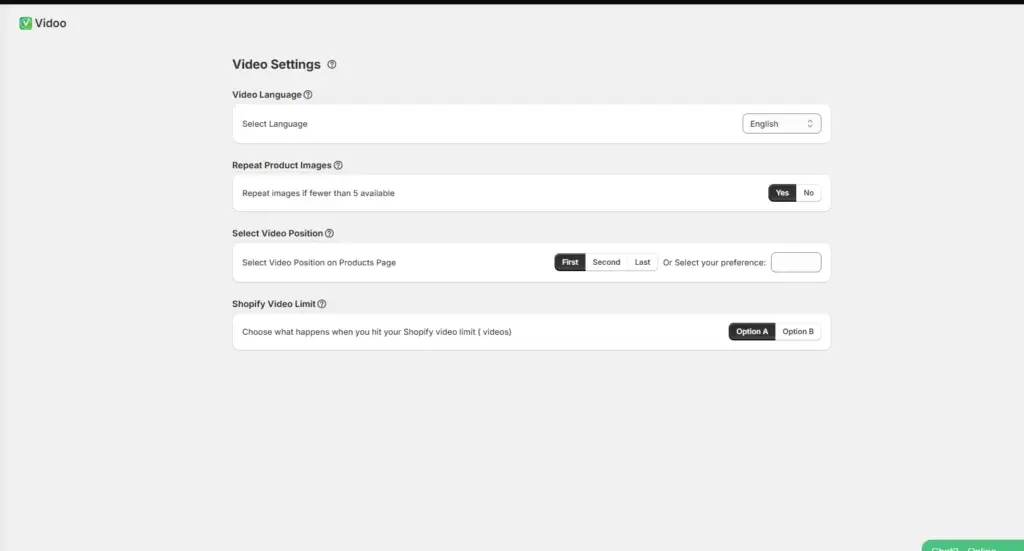
The Video Settings page allows you to customize how Vidoo creates, displays, and manages your product videos on your Shopify store.
Video Language #
Field: Select Language
Description: Choose the language for your video captions and on-screen text.
Tip: Select the language that best matches your target audience. Vidoo will automatically localize the text and captions in your videos.
Repeat Product Images #
Field: Repeat images if fewer than 5 available
Description: Each video uses 5 images to maintain a dynamic and engaging flow.
Tip: If a product has fewer than 5 images, Vidoo will automatically repeat existing ones to create a complete videos.
Select Video Position #
Field: Select Video Position on Product Page
Description: Decide where your product video appears in your product gallery.
Options:
- First: Display the video before all product images.
- Second: Display the video after the first product image.
- Last: Display the video after all product images.
- Select your preference: Use this option to specify your preferred placement for the product video.
Tip: Choose the position that best fits your store’s visual layout and user experience.
Shopify Video Limit #
Field: Choose what happens when you hit your Shopify video limit.
Description: Your Shopify plan allows from 250 videos on the Basic plan up to 50,000 videos on the Enterprise plan. Once you reach your limit, choose how Vidoo should manage any additional videos.
Options:
- Replace Old Videos: Automatically replace the oldest product video with a new one.
- Generate with Embed Tags: Create the video with embed tags for manual upload. (Embedded videos don’t count toward your Shopify video limit.)
Tip: Use embed tags if you want to retain older videos while adding new ones.