

How to Block Someone on TikTok? Full Guide 2026
Last Updated on April 14, 2026 by Himanshu Rawat
TikTok is one of the most popular social media apps today, but not everything on it is always nice or comfortable. That’s why TikTok gives you options to control what you see and who can interact with you.
One of the most useful features is the block option. If someone is bothering you, sending unwanted comments, or you just don’t want to see their content, you can block them easily.
In this guide, you’ll learn how to block someone on TikTok and what happens after you block them.

What is the Blocking Feature on TikTok?
The block feature on TikTok allows users to prevent specific accounts from interacting with them. When you block someone on TikTok, their posts, comments, and likes will no longer appear in your feed. This is a simple way to maintain control over the type of content you see and interact with on the platform. Blocking can help you curate a more positive and personal experience on TikTok.
Did You Know? According to a 2023 Pew Research study, over 40% of Americans have experienced some form of online harassment. The block feature is one of the simplest and most effective ways to protect yourself.
Reasons to Block Someone on TikTok
There are many reasons to block someone on TikTok. Here are some:
- Stopping Rude Comments
If someone is being rude or annoying, blocking them makes it stop. - Keeping Your Privacy Safe
If someone is checking your profile too much or bothering you, blocking them protects your privacy. - Not Seeing Negative Content
If someone’s posts make you feel bad, blocking them will stop their posts from showing up. - Blocking Spam Accounts
If an account is spamming or a bot, blocking them will clean up your feed. - Avoiding Arguments
If you don’t want to deal with drama or arguments, blocking helps you avoid them. - Protecting Your Mental Health
If someone’s behavior makes you stressed or anxious, blocking them makes your TikTok experience more positive.
What Happens When You Block Someone on TikTok
When you block someone on TikTok, here’s what happens:
- No Content Visibility: The blocked account’s posts, comments, and likes will no longer appear in your feed.
- No Interaction: The blocked user won’t be able to comment on or like your posts.
- Privacy Protection: The blocked user won’t be able to view your profile or interact with you in any way.
Although TikTok does not notify the blocked user directly, they may realize they have been blocked if they stop seeing your content or interaction with them. However, there’s no way for them to know for sure unless they specifically try to search for your profile.
How to Block Someone on TikTok?
There are three easy ways to block someone on TikTok. You can do it from their profile, from a comment, or from a direct message. Here’s how each one works:
Method 1: Block from Their Profile
This is the most common way to block someone. Here’s how to do it:
- Search for the user you want to block or visit their profile directly.
- Tap the three vertical dots or arrow icon in the top right corner of their profile.

- Choose the “Block” option from the menu and Confirm your action.
Done! This works great when you already know who you want to block and can find their profile easily.
Method 2: Block from a Comment
If someone leaves a rude or spam comment, you can block them directly from there.
- Find their comment
- Press and hold the comment
- Tap “Block”
- Tap “Block” again to confirm
This is super handy if you’re a creator and keep seeing the same person leaving nasty comments on your videos. Instead of hunting down their profile, just long-press and block right there.
Quick note: Their old comments won’t disappear after you block them. Other people can still see those comments. If you want them gone, you’ll have to delete them one by one yourself.
Method 3: Block from a Direct Message (DM)
Getting weird or unwanted DMs? You don’t have to put up with it. You can block someone straight from your inbox without even going to their profile. Here’s how:
- Open the chat with that person
- Tap their name or profile picture at the top
- Tap the three dots
- Tap “Block” and confirm
After you block them, they won’t be able to send you messages or interact with your account anymore.
How to See Blocked Accounts on TikTok
To view your blocked accounts on TikTok:
Step 1 : Go to your profile page.
Step 2 : Tap the three vertical lines in the top right corner.
Step 3 : Select “Settings and Privacy.“

Step 4 : Scroll down and tap “Privacy.“
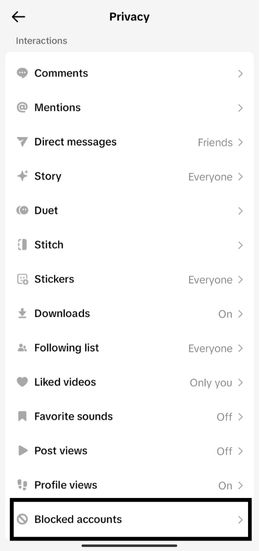
Step 5 : Look for the “Blocked Accounts” section.
Blocking users on TikTok is a straightforward process that can help you tailor your experience on the platform. By understanding how to block users individually and the implications of blocking, you can effectively manage your content and maintain a positive online environment.
How to Unblock Someone on TikTok
Changed your mind about blocking someone? No problem. Unblocking on TikTok is just as easy as blocking. Maybe you blocked someone by accident, or things have cooled down and you’re okay with them seeing your content again — whatever the reason, here’s how to do it:
Step 1: Open TikTok and go to your profile by tapping the Profile icon at the bottom right of the screen.
Step 2: Tap the three horizontal lines in the top right corner to open the menu.
Step 3: Tap “Settings and Privacy.”
Step 4: Tap “Privacy.”
Step 5: Scroll down and tap “Blocked Accounts.” This will show you a full list of everyone you’ve ever blocked.
Step 6: Find the person you want to unblock and tap the “Unblock” button next to their name.
Step 7: Tap “Unblock” again to confirm.
That’s it! Once you unblock someone, they can immediately find your profile, watch your videos, follow you, and send you messages again — as long as your privacy settings allow it.
Final Thoughts
Blocking someone on TikTok is a simple way to control your experience on the app. If someone is being annoying, negative, or spammy, you don’t have to deal with it—you can just block them. And if you change your mind later, you can easily unblock them.
At the end of the day, TikTok should feel fun and comfortable to use. The block feature helps you keep your space positive and stress-free.
FAQs for How to Block Someone on TikTok

AI-Powered Social Media Marketing for Online Stores
Automated Viral Reels, Shorts, Videos, Stories, Promotions, Reviews. 5X more engagement and sales