

How to Collaborate on Instagram: A Step-by-Step Guide
Last Updated on March 3, 2026 by Himanshu Rawat
The Instagram Collab feature allows two or more accounts to co-author a single post or Reel that appears on all collaborators’ profiles. If you’re wondering how to collaborate on Instagram, this guide explains exactly how the feature works, how to add a collaborator, how to accept an invite, and how to fix common issues.
Unlike simply tagging someone, an Instagram collab post shares engagement (likes, comments, shares) across all participating accounts — making it one of the most powerful organic growth tools on Instagram.
What Is an Instagram Collab Post?
An Instagram collab post is a single piece of content (Feed post or Reel) that is published by one account and co-authored with another.
When a collaborator accepts the invite:
- The post appears on both profiles
- Engagement is shared
- Both usernames appear at the top
- Comments and likes are unified
This is different from tagging, where the post only lives on one profile.
How to Add a Collaborator on Instagram (Step-by-Step)
Here’s how to collaborate on Instagram using the Collab feature:
- Create your post
Start by making your usual post—this could be a photo, video, or even a Reel.

- Tap ‘Tag People’
When you’re writing your caption, tap on “Tag People” like you usually would. But this time, choose ‘Invite Collaborator’.

- Search for your collaborator
Type in the name of the person or brand you want to collaborate with and pick them from the list. - Wait for approval
Your collaborator will get a notification. They’ll either accept or decline the collab invite. - Post and share
Once they accept, the post will appear on both of your feeds, and both of you can interact with comments and likes. - Engage with your audience
Keep replying to comments and encourage your collaborator to do the same. This helps the post get more attention.’
Note: You can only collaborate with public accounts that accept your request.
How to Accept an Instagram Collaboration Request
If someone invites you:
- Check your notifications
You’ll get a notification saying someone invited you to be a collaborator on their post. - Tap on the notification
Open the notification and you’ll see the post they want to share with you. - Tap ‘Review’
You’ll see an option to review the invite. Tap on it. - Tap ‘Accept’
If you’re happy with the post and the collab, just tap Accept—and that’s it! - The post goes live on your feed too
Once you accept, the post will show up on your profile as well, and both of you will share likes, comments, and views.
How to Collaborate on Instagram After Posting
Yes — Instagram now allows you to add a collaborator after publishing.
Here’s how:
- Go to the post
- Tap the three dots (⋯)
- Tap Edit
- Tap Tag People
- Tap Invite Collaborator
- Select the account and save
The collaborator must still approve.
This update fixed one of the biggest limitations of the feature.
Who Can Use the Instagram Collab Feature?
There are some rules:
- Public accounts can invite public and private accounts
- Private accounts can invite users who follow them
- You can add up to 5 collaborators per post
- Only Feed posts and Reels support collabs
If a public account accepts a collab from a private account, the post becomes publicly visible.
Why Use Instagram Collab Posts?
Here are five key benefits of Instagram Collab posts for brands and creators. Have a look at how to grow smarter together, from expanding your reach by doubling to increasing engagement and forming genuine partnerships.
1. Increase Your Audience
Sharing a post with a collaborator exposes your content to a larger, more relevant audience because it shows up in both of your feeds. Without using paid advertisements, this dual visibility helps grow engagement and draw in new followers.
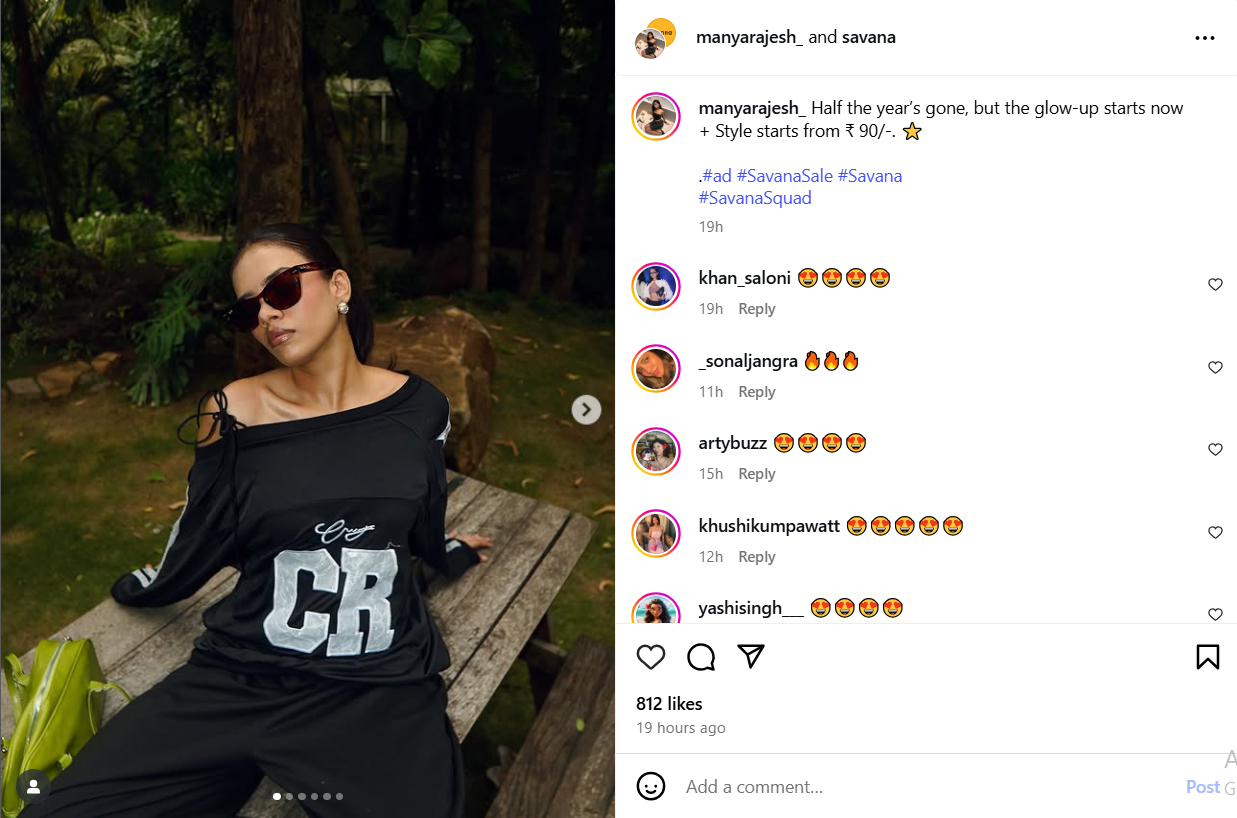
Example: Savana A clothing brand partners with a local fashion influencer. Their shared post introduces the brand to thousands of engaged fashion followers instantly.
2. Increase Participation
Likes, comments, shares, and views from all audiences are combined into a single post in collaborative posts, which consolidate engagement. By demonstrating strong social proof, this improves the post’s algorithm performance and promotes more interaction.
3. Develop the Authenticity of Your Brand
Your credibility increases when you collaborate with another reputable brand or creator. If someone you already follow and respect endorses your message, followers are more likely to believe it and interact with it. Better conversion rates and increased loyalty may result from this perceived authenticity.
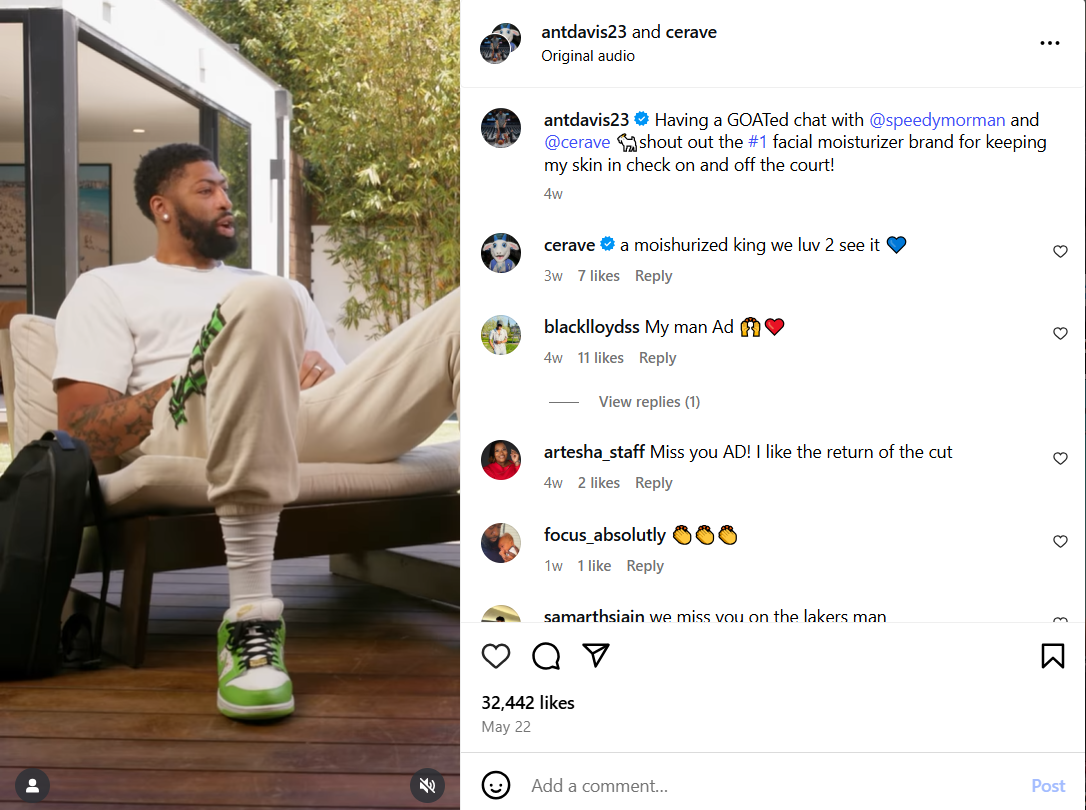
Example: Cerave, a skincare brand, collaborates with a reputable basketball player, antdavis23. The shared values reassure followers that the brand is genuine, not just marketing.
4. Make Content Creation Easier
When people collaborate, they divide up the creative work; each person contributes their resources, ideas, and abilities. This relieves pressure on any one person to do it all and frequently results in richer, more imaginative content. Additionally, brainstorming with another person generates novel and surprising ideas.
Example: Take a look at how @jayshetty and @emmagrede, two podcasters, co-host an Instagram Live and cross-promote with teaser clips, behind-the-scenes reels, and shared Q&As, maximizing content from a single session.

5. Cross-Promote Without Trying
Whether you’re supporting a cause, promoting an event, or launching a new product, collaborative posts are perfect for well-planned campaigns.
Both parties appear as co-authors of a single piece of content rather than making multiple posts and tagging one another. This helps both audiences understand the collaboration and maintains consistency in the messaging.

Types of Instagram Collaborations
- Shoutouts: One of you posts about the other, helping to introduce each other’s followers to your content.
- Co-Authored Posts: Both accounts create a post together and share it on each other’s feeds. It’s a great way to get both audiences involved.
- Giveaways: You and another account can team up for a giveaway. Followers have to follow both accounts and engage to enter.
- Takeovers: One person “takes over” the other person’s Instagram for a day—posting stories, photos, or even going live.
- Product Collaborations: Brands can work together to create a new product or feature each other’s products in a post.
How to Find the Right Collaborators
If you want your collab to work well, it’s super important to choose the right person. Here’s how you can do that:
- Find someone with similar content
Look for people who post about things like you. If your styles match, their followers will probably like your content too. - Check their engagement
Don’t just look at how many followers they have. See if people actually like, comment, and share their posts. - Think about their audience
Ask yourself: would their followers be interested in what I do? If yes, that’s a good fit! - See if they’ve done collabs before
If they’ve worked with others in the past, you can check how it went and what kind of content they created. - Send a friendly message
When you reach out, keep it simple. Say hello, explain your idea, and let them know why you’d love to collaborate.
Tips for a Successful Instagram Collaboration
Want your collab to actually work and not just look good? Here are some simple tips:
- Pick the right person
Team up with someone whose style and audience match yours. It makes everything feel more real and less forced. - Be clear from the start
Talk about the post idea, who’s doing what, when it’s going live, and anything else that matters. The more clear you are, the smoother it goes. - Keep it real
Don’t try to fake it. People can tell when a collab is just for show. Be genuine and make sure it feels natural. - Promote it together
Share stories, reply to comments, and hype each other up. That’s the whole point of teaming up! - Check the results
After it goes live, take a look at how it did—likes, comments, saves, shares. It’ll help you learn what worked. - Engage with Comments
Since both audiences are interacting, responding to comments can build stronger relationships with new followers.
Common Mistakes to Avoid
Even the best collabs can flop if you’re not careful. Here are some common mistakes to steer clear of:
- Choosing the wrong partner
Don’t collab just for followers. If their content doesn’t match yours, it won’t feel right—and their audience won’t care. - Not talking things through
If you don’t plan properly, you might end up with miscommunication, delays, or just a messy post. Always discuss the details first. - Making it feel like an ad
If the collab feels too salesy, people will scroll past it. Keep it fun, honest, and true to your usual style. - Ignoring the audience
Always think about what their followers want to see, not just yours. That way, both sides get value. - Forgetting to engage
Don’t post and ghost. Reply to comments, like responses, and show up—it helps the post perform better and builds trust.
Stand out on Instagram with AI-made Reels from Outfy. |  |
Conclusion
Instagram collabs are a great way to grow, get noticed, and connect with new people. Whether you’re teaming up with a friend, a brand, or another creator, it’s all about sharing audiences and creating something fun together.
Just remember—pick the right partner, keep things clear and real, and don’t overthink it. The more natural it feels, the better it works.
Now go ahead and try it out—your next collab might just be your best post yet!
How to Collaborate on Instagram: FAQs
Q1: Can you collaborate on Instagram after posting?
Yes. Instagram now allows you to add a collaborator even after your post is live. Simply go to the post, tap the three dots (⋯), select Edit, tap Tag People, then choose Invite Collaborator. The other account will need to approve the invitation before the post appears on their profile.
Q2: How to collaborate on Instagram Story?
Instagram doesn’t currently support full collaboration for Stories like it does for feed posts. However, you can @mention someone in your Story. They’ll get a notification and can choose to reshare it to their own Story — this is the closest available method.
Q3: Why can’t I add a collaborator on Instagram?
You may not see the option if:
- Your app isn’t updated
- The account is private and doesn’t follow you
- The feature isn’t available in your region
- The account has restricted tags
Q4. How many people can be added as collaborators on a single Instagram Collab post?
You can invite up to five collaborators to a single Collab post, making it visible on all invited accounts’ profiles and sharing engagement across audiences.


AI-Powered Social Media Marketing for Online Stores
Automated Viral Reels, Shorts, Videos, Stories, Promotions, Reviews. 5X more engagement and sales